ZTXGate: Zero Trust Network Access You Control
Your people work from offices, homes, and everywhere in between. Your applications and infrastructure may live on-premises, in the cloud, or across both.
ZTXGate gives users access to the resources they need without giving them broad access to the surrounding network.
Deploy it inside infrastructure operated by your organization or MSP, integrate it with the identity and security systems you already use, and enforce access according to user, device, resource, and policy.
Zero Trust Without Rebuilding Your Infrastructure
Moving beyond traditional remote-access VPNs should not require replacing everything around them.
Install ZTXGate on a Linux server or cloud VM. Enroll users and their devices. Define the resources they are allowed to reach. Then apply identity-, device-, and policy-aware access without requiring a mandatory CoreZT-hosted cloud control plane.
Use ZTXGate on-premises, in the cloud, across hybrid infrastructure, or in isolated environments.
How ZTXGate Works
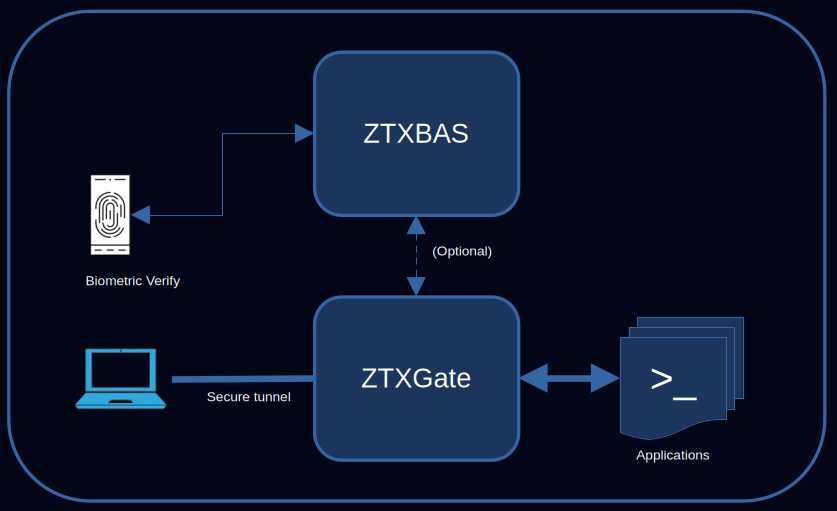
- Install ZTXGate on a Linux server or cloud VM inside the selected customer or MSP operating environment.
- Users enroll their devices through the self-service enrollment process.
- Define access policies using identity, role, device, posture, network location, time, and resource.
- ZTXGate enforces access when connections are established and continues to evaluate policy as relevant conditions change.
Managed endpoints use WireGuard-based connectivity to reach authorized resources through ZTXGate.
Access is based on policy rather than simple network presence.
Explore ZTXGate architecture · WireGuard & ZTNA
Least-Privilege Access by Resource
A remote user rarely needs access to an entire private network.
ZTXGate lets you define access around the actual resource being protected. A policy can combine user identity, role, enrolled device, device trust or posture, network location, time-of-day conditions, protected resource, and access duration.
Set standing access for everyday resources and tighter conditions for sensitive systems.
Just-in-Time and Request-and-Approve Access
Not every permission needs to exist permanently.
For sensitive resources, ZTXGate can require users to request access before a connection is allowed. Designated approvers receive the request, approve an appropriate access window, and ZTXGate removes that access automatically when the approved period ends.
Use it for administrative systems, production environments, sensitive applications, or other resources where permanent access is unnecessary.
Continuous Policy Enforcement
An access decision should not become permanent just because a connection has already started.
ZTXGate continues to evaluate active access as relevant policy conditions change. If a user's role changes, an allowed time window closes, or a device no longer meets required posture conditions, ZTXGate can revoke access without waiting for the user to reconnect.
Individual Device Identity
ZTXGate enrolls and tracks each device separately, allowing administrators to distinguish between a user's laptop, phone, tablet, and other enrolled endpoints.
If a device is lost, retired, or no longer trusted, it can be revoked without disabling the user's other devices.
Device Posture as a Policy Input
For connected environments, ZTXGate can use posture information from existing endpoint-security platforms as part of an access decision.
Current integrations include:
- Microsoft Intune
- Microsoft Defender for Endpoint
- SentinelOne Singularity
- CrowdStrike
- Jamf
Policies can use device compliance or risk information when deciding whether a resource should be accessible. Third-party posture integrations naturally depend on connectivity to the corresponding service.
Explore identity and device trust
Identity Integration
ZTXGate can connect to your existing identity environment instead of becoming another standalone user directory that administrators must maintain manually.
OIDC Single Sign-On
Use an OIDC identity provider for user authentication and single sign-on.
SCIM Provisioning
Use SCIM to synchronize users and identity lifecycle changes. Where appropriate, directory groups can be mapped to ZTXGate roles so identity changes can flow into access policy without duplicating administrative work.
Step-Up Authentication for Sensitive Resources
Some resources require stronger verification than others.
ZTXGate allows additional authentication to be applied according to policy using supported methods. When licensed with ZTXGate, ZTXBAS is tightly integrated as a library and does not require a separate ZTXBAS server deployment. Connected deployments can also use supported cloud-dependent options such as Okta Verify Push and Duo Push where those services are reachable.
This lets administrators add another verification step to sensitive access without requiring the same workflow for every routine connection.
Clientless HTTP/HTTPS Access
Not every user or application requires tunnel-based access.
ZTXGate also provides clientless access for HTTP and HTTPS applications through its policy-enforcing proxy. Users can reach authorized web applications without installing WireGuard on the endpoint, while ZTXGate terminates the incoming connection and establishes the authorized connection to the protected application.
Because the proxy operates at the HTTP layer, policies can be applied with application-level context where appropriate.
Clientless access is useful for browser-based applications, contractors, third parties, and endpoints where installing connectivity software is undesirable.
Clientless access is available as a licensed ZTXGate capability.
SIEM Integration
ZTXGate can export security and audit events using:
- RFC 5424 syslog
- ArcSight CEF
- JSON
Events can be transported using UDP, TCP, or TCP with TLS according to the integration.
Searchable Audit Records
ZTXGate records access, authentication, and policy activity so administrators can investigate what happened without reconstructing events from unrelated systems.
Records can be searched and exported for operational reviews, investigations, and audit activities. These capabilities can support evidence collection for an organization's compliance and audit programs; they do not by themselves represent certification against a particular framework.
Manage ZTXGate From One Place
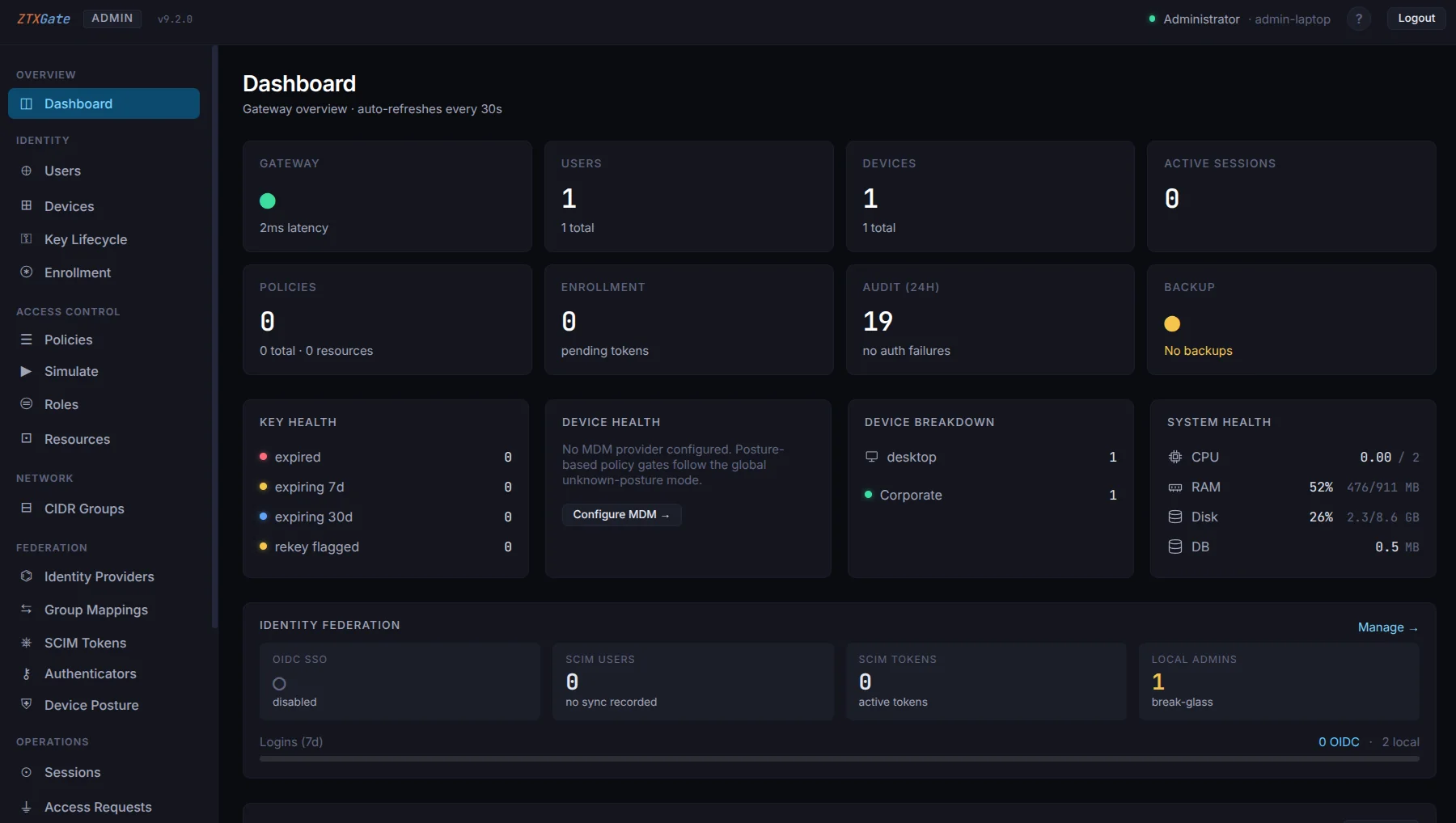
The ZTXGate administration portal brings users, devices, resources, policies, active sessions, logs, and license information into one interface.
Built-in administrative roles separate common responsibilities:
- Administrators manage policy and overall configuration.
- Helpdesk users can handle appropriate day-to-day device administration.
- Auditors receive read-only visibility where oversight is required.
A built-in policy simulator lets administrators evaluate a proposed (user, device, resource) decision before relying on it in production.
Users receive their own self-service portal where they can see available resources, manage enrolled devices, and request access where approval is required.
Backup and Recovery
ZTXGate supports scheduled backups covering configuration and operational data, along with pre-migration snapshots before upgrades. Recovery procedures help administrators restore the system on replacement infrastructure when necessary.
Deploy Where You Operate
ZTXGate can be operated by the customer or an MSP. Core access operation does not require a mandatory CoreZT-hosted cloud control plane.
On-Premises
Run ZTXGate on infrastructure in your office or data center. Explore On-Premises ZTNA.
Cloud
Deploy ZTXGate on a Linux VM in the cloud and apply the same access policies to cloud-hosted resources.
Hybrid
Use ZTXGate with environments that span on-premises and cloud-hosted resources.
Air-Gapped
ZTXGate can be deployed in isolated environments where the core access platform cannot depend on an external cloud service. Features that depend on external identity, MDM, EDR, SIEM, or authentication services naturally require those services to be reachable.
Optional Central Management with ZTXHub
ZTXGate does not require a central CoreZT service for core access operation. Connected deployments that want centralized software update and license management can optionally use ZTXHub, a service owned and operated by CoreZT.
Without ZTXHub, ZTXGate deployments continue to operate independently and use manual license and software update workflows.
Explore the control-plane model
ZTXGate and Traditional Remote-Access VPNs
VPN technology remains useful and can be deployed securely. The architectural difference is where access control begins.
A traditional remote-access VPN normally establishes network connectivity first. Additional network controls then determine what the connected endpoint is allowed to reach. ZTXGate is designed around authorization to defined resources.
| Capability | ZTXGate | Traditional remote-access VPN |
|---|---|---|
| Resource-level access policies | Built in | Depends on surrounding network controls |
| Identity-aware policy | Built in | Depends on VPN and identity stack |
| Individual device enrollment | Built in | Varies |
| Device posture as policy input | Supported through integrations | Varies |
| Temporary access | Built in | Requires surrounding workflow/control |
| Request-and-approve access | Built in | Requires surrounding workflow/control |
| Continuous policy enforcement | Built in | Varies |
| OIDC and SCIM | Built in | Varies |
| Step-up authentication by resource | Built in | Varies |
| Searchable access records | Built in | Varies |
| SIEM export | Built in | Varies by platform |
| Customer- or MSP-operated deployment | Yes | Commonly available |
The goal is not to claim that every VPN deployment is insecure. The difference is that ZTXGate makes identity-, device-, and resource-aware authorization the primary access model rather than adding it around broad network connectivity.
Security and Trust
ZTXGate combines least-privilege policy, individual device identity, continuous enforcement, identity integration, step-up authentication, audit records, and customer- or MSP-operated deployment.
Built for Growing Teams
ZTXGate is designed for organizations that need stronger access control without turning remote access into a large security-infrastructure project.
- IT teams manage users, devices, resources, policy, and access visibility from one place.
- Security teams use device posture, temporary access, continuous enforcement, audit records, and SIEM integration.
- Developers and technical teams reach authorized infrastructure without requiring broad access to the surrounding private network.
- Compliance and audit teams can search and export access records that support reviews and evidence collection.
Licensing
ZTXGate uses per-user, per-year licensing. Specific capability entitlements can vary by license; contact CoreZT for the appropriate configuration for your deployment.
Volume pricing is available for larger deployments.
Start With a Focused Deployment
You do not need to migrate every user and resource at once.
- Install ZTXGate on a Linux server or cloud VM.
- Enroll the first user devices.
- Define a small set of protected resources.
- Apply access policies.
- Validate the experience and expand the deployment.
Evaluate the Architecture
If you are comparing access models rather than only product features, these guides go deeper: